1
AI voice cloning
Creates synthetic voices that users describe as incredible for a web based casual tool.
PopPop AI is a free, browser-based audio toolkit that combines text-to-speech in over 20 languages, a vocal remover, AI song covers, a voice changer, and a text-prompt sound effect generator in one place. With no downloads or sign-up needed, it suits creators and hobbyists making quick voiceovers, karaoke tracks, and casual audio projects rather than studio-grade production.
Independent review — we test tools ourselves and analyze public user reviews. How we test.
The service delivers convenient AI voice cloning with outputs that many users find impressive for casual use. Interface simplicity and daily credits suit light, experimental workflows. However, the voice library feels limited, especially for specific fandoms, and reliability issues with file uploads and credit handling are concerning. Best suited to hobbyists and content creators who can tolerate some errors in exchange for easy access and free credits.
PopPop AI is a free, browser-based audio toolkit that bundles several sound tools into one site with no downloads, and often no account, required. The lineup covers text-to-speech with around 200 voices in more than 20 languages, a vocal remover that splits any track into instrumental and acapella versions, an AI song cover generator, a voice changer with cloning, and a sound effect generator that creates audio from typed descriptions. Outputs download as MP3 files.
The appeal is friction-free access: creators use it for karaoke tracks, quick voiceovers, and placeholder sound effects without touching professional software. The vocal remover performs surprisingly well on clean studio mixes, though complex tracks can leave artifacts. The trade-offs are usage caps of around 15 audio files per day, output quality that varies on demanding tasks, and none of the fine-grained control of a real production suite, making it a creative playground for hobbyists and content creators rather than a studio replacement.
Creates synthetic voices that users describe as incredible for a web based casual tool.
Simple website experience praised as convenient to use for quick voice experiments.
Per generation credit system criticized when failed jobs still deduct credits.
Supports loading audio files, but reviewers report frequent errors on upload or processing.
Fewer voices than some competitors and lacks many requested K pop idols.
Company reply highlights generous credits for casual daily users, easing light experimentation.
Team acknowledges server issues and claims improvements, indicating active maintenance.
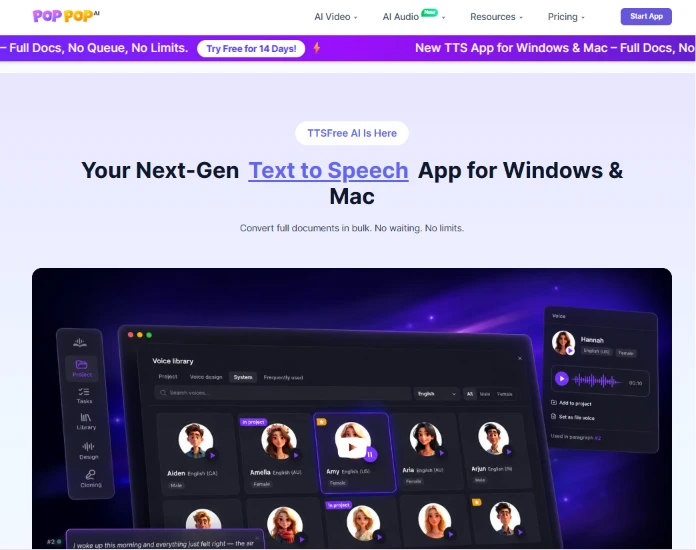
I started on the homepage without signing in, to see what the site tells a visitor who has not committed to anything yet.
It sells one idea: text to speech. The hero line reads "Your Next-Gen Text to Speech App for Windows & Mac", the subline promises full documents converted in bulk with no waiting, and a purple banner across the top pushes a 14 day free trial. The mockup underneath shows a voice library stocked with names like Aiden, Amelia, Amy, Aria and Arjun, each tagged with an accent and a gender.
Nothing on this screen mentions 3D. The top nav carries AI Video, AI Audio, Resources and Pricing dropdowns, so everything I was about to spend the next hour on is buried a level down. Landing here cold, I would have read this as a text to speech product and left.
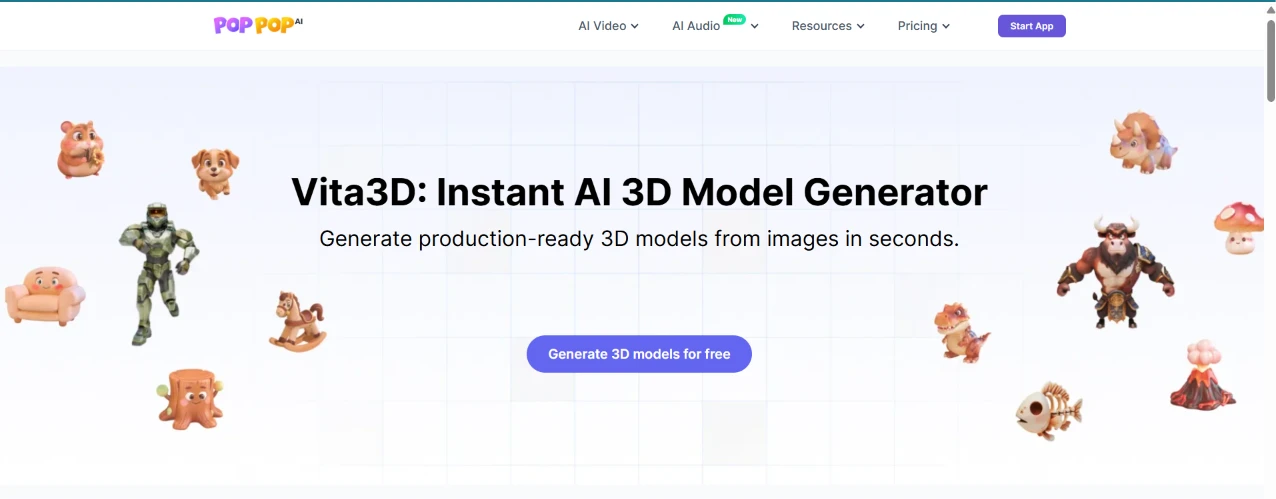
Digging past the homepage got me to Vita3D, which is the part of the platform that handles 3D.
The page is wallpapered with sample models. A hamster, a puppy, an armoured soldier, a rocking horse, a spotted mushroom, a horned bull creature, a skeletal fish and a volcano all float around a headline promising production-ready 3D models from images in seconds. One button sits in the middle of it: "Generate 3D models for free".
The samples raised my expectations more than the copy did. Several of them look like game assets rather than prompt output, which is exactly why I wanted to throw my own drawing at it.
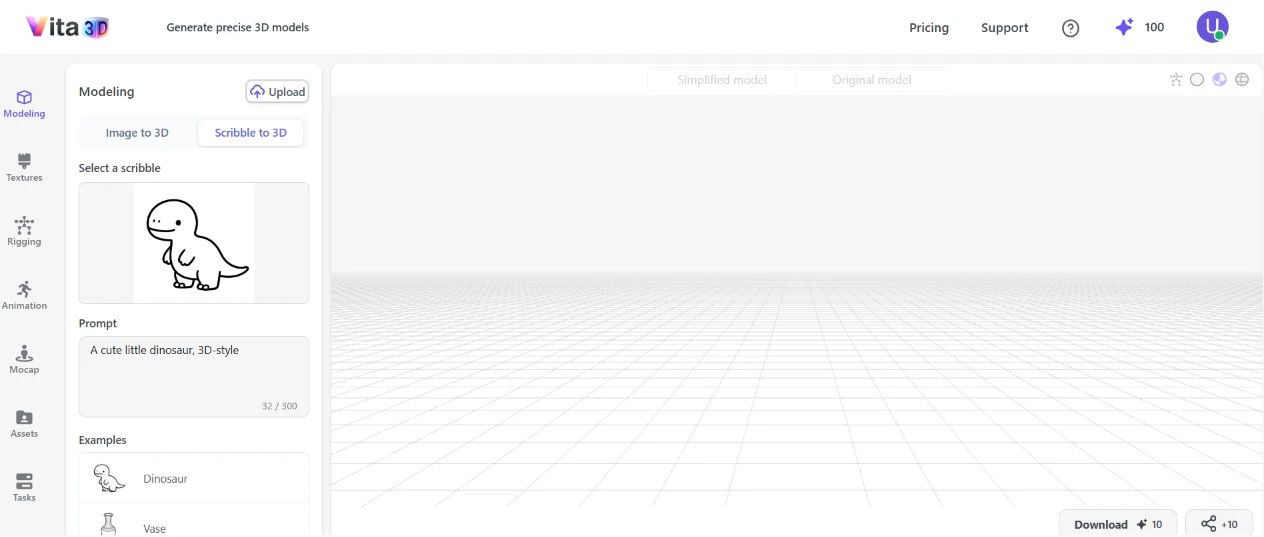
Inside Vita3D I opened the Modeling section and switched the tab from Image to 3D across to Scribble to 3D. I uploaded my line drawing of a cartoon dinosaur and typed the prompt "A cute little dinosaur, 3D-style", which the counter logged at 32 of 300 characters. My balance read 100 credit points in the top right and the run was priced at 10.
The workspace is easy to read. A left rail stacks Modeling, Textures, Rigging, Animation, Mocap, Assets and Tasks in roughly the order you would use them, and the viewport takes everything else.
One detail I clocked and then forgot about: Download 10 and share +10 were already sitting in the corner of an empty viewport, before I had generated anything at all.
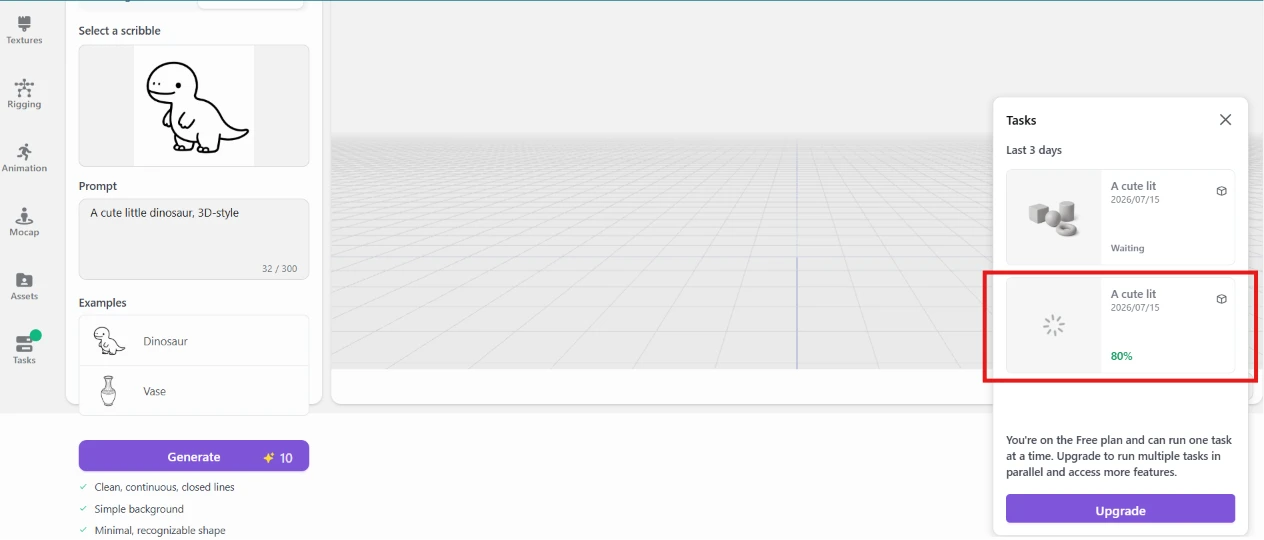
I hit Generate and opened the Tasks panel to watch it work.
Two jobs appeared under "Last 3 days". One sat at Waiting while the other climbed to 80 percent, which is the one boxed in red here. Below them, a notice told me the Free plan runs one task at a time and offered an Upgrade button for parallel jobs.
The live percentage was the part I appreciated. It is a small thing, but a number that moves is the difference between waiting and wondering whether the click even registered.
The queue is the part I did not appreciate. One task at a time means any second idea sits behind the first, and the panel makes sure you know an upgrade would fix that.
Under the Generate button there was a checklist asking for clean, continuous, closed lines. It also wanted a simple background behind a minimal, recognisable shape. My scribble ticked every box, so I had no excuse lined up if the result came back wrong.
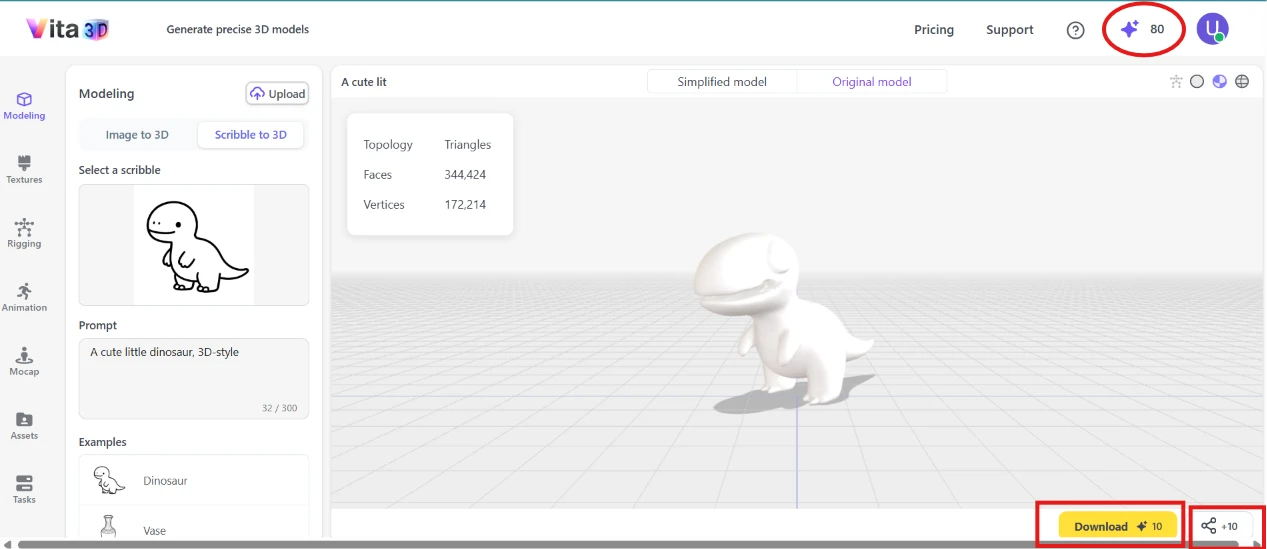
The model came back and it is a fair read of my drawing. A clean white dinosaur stood on the grid, up on two legs with its tail out for balance, roughly the proportions I had sketched. The stats panel reported 344,424 faces and 172,214 vertices under a Triangles topology, and tabs offered a Simplified model alongside the Original model.
Then I looked at my credits.
The counter had dropped from 100 to 80, circled in red here, because two generation jobs had gone through rather than one. My first usable dinosaur cost 20 points.
The bottom right corner is where this step turned for me. Generating the model does not hand me the model. Download costs 10 more, sharing costs another 10 on top of that, and those two buttons had been sitting there since before I generated anything. I had paid to make the dinosaur and I still could not take it out of the browser without paying again.
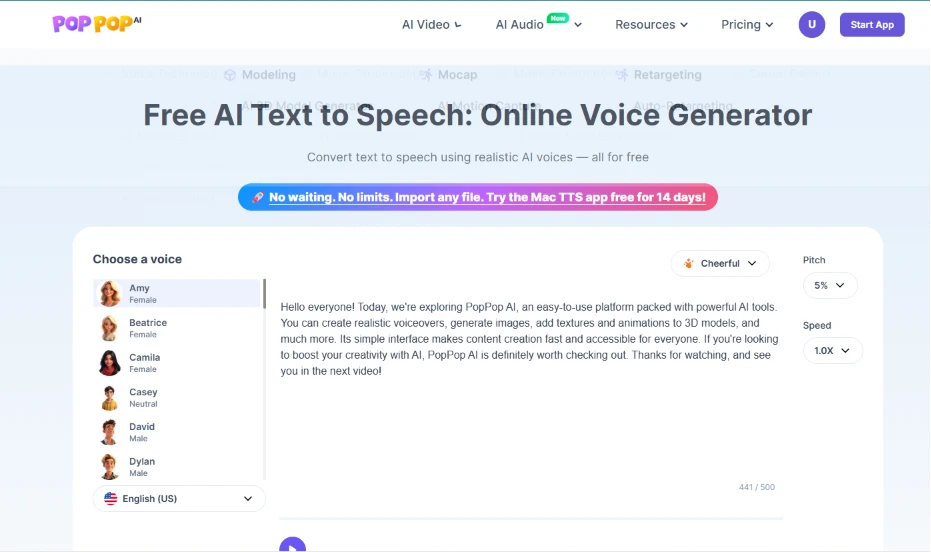
I switched to the audio side and pasted a script into the text to speech generator. Here is what I fed it:
"Hello everyone! Today, we’re exploring PopPop AI, an easy-to-use platform packed with powerful AI tools. You can create realistic voiceovers, generate images, add textures and animations to 3D models, and much more. Its simple interface makes content creation fast and accessible for everyone. If you’re looking to boost your creativity with AI, PopPop AI is definitely worth checking out. Thanks for watching, and see you in the next video!"
The voice list gave me Amy, Beatrice, Camila, Casey, David and Dylan, each tagged with a gender, with English (US) picked in the language dropdown. Off to the right sat a Cheerful tone preset. Pitch was on 5 percent and speed on 1.0X.
It took 2 to 3 minutes to generate and click here to listen to the speech.
That is slow for 441 characters. The controls are better than anything Vita3D handed me, since a tone preset and a pitch dial beat what the modelling page offered. The ceiling is what stings. My script was a short video intro and it filled 441 of the 500 characters allowed, so anything longer than a paragraph has to be chopped into pieces and stitched back together afterwards.
No credit counter appears anywhere on this page, and the headline calls the generator free.
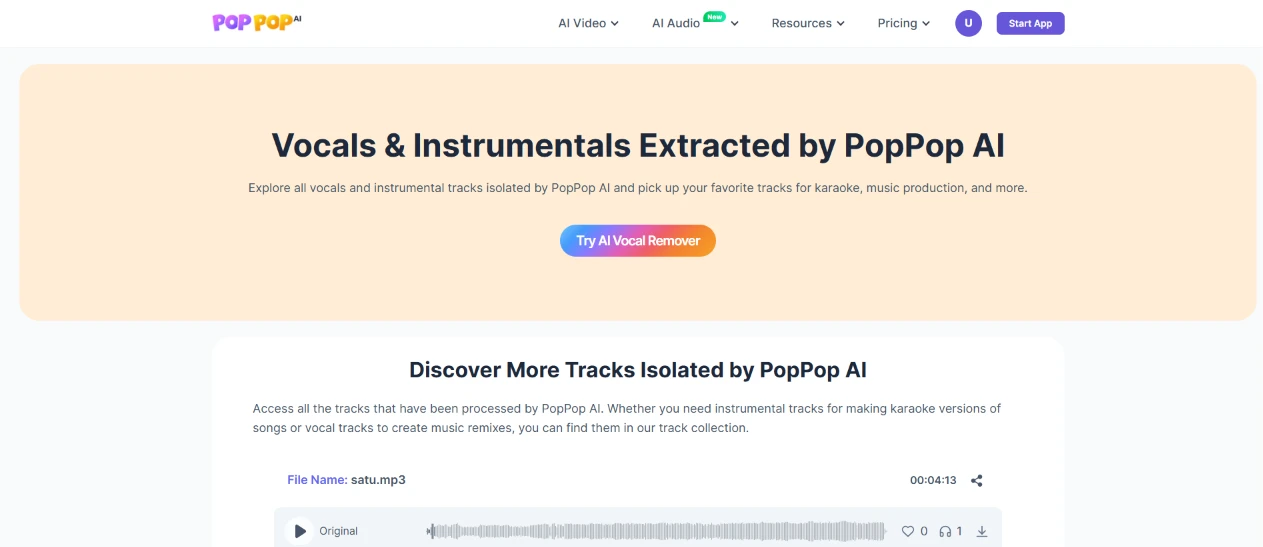
Next I looked at the vocals and instrumentals feature.
The page opens on "Vocals & Instrumentals Extracted by PopPop AI", with a line about picking up favourite tracks for karaoke or music production, and a single "Try AI Vocal Remover" button. Below it, a section headed "Discover More Tracks Isolated by PopPop AI" starts listing processed files, beginning with satu.mp3 at 00:04:13.
What struck me is that this page opens on a browse view. The upload path is one button, competing for attention with a gallery of separations that other people already ran.
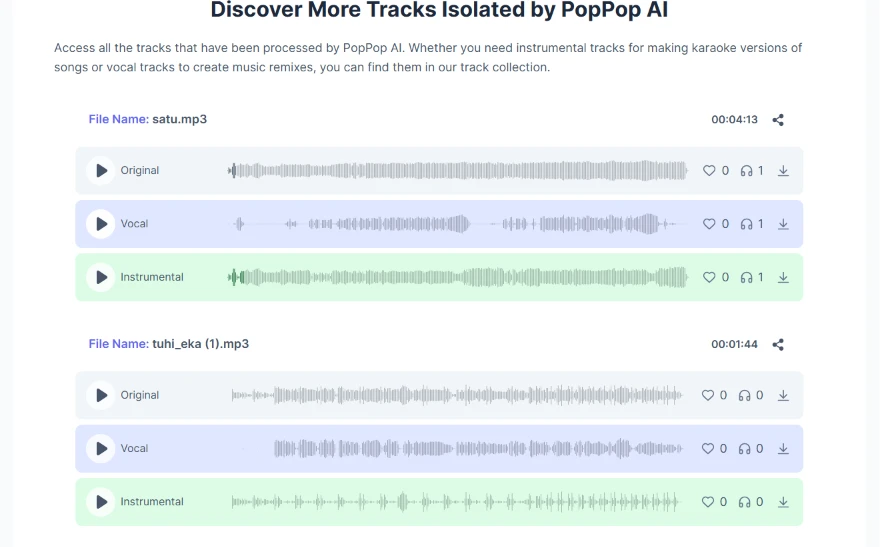
Scrolling gave me the collection in full, and this is the clearest look at what the feature actually produces.
Two files are listed. satu.mp3 runs 00:04:13 and tuhi_eka (1).mp3 runs 00:01:44. Each one expands into an Original row with a Vocal and an Instrumental sitting beneath it, and every row carries its own waveform, a play button, a like counter, a listen counter and a download arrow.
The waveforms do the explaining here. On satu.mp3 the vocal row is visibly sparse, thinning into gaps where nobody is singing, while the instrumental row underneath runs dense and unbroken across the full four minutes. That is the shape a working separation should have, and I could read it without pressing play once.
What I could not do is judge it on my own audio. Both files sitting here belong to the platform’s track collection, at 0 likes and 1 listen. The page showed me the output format without me having run a single file of my own through it.
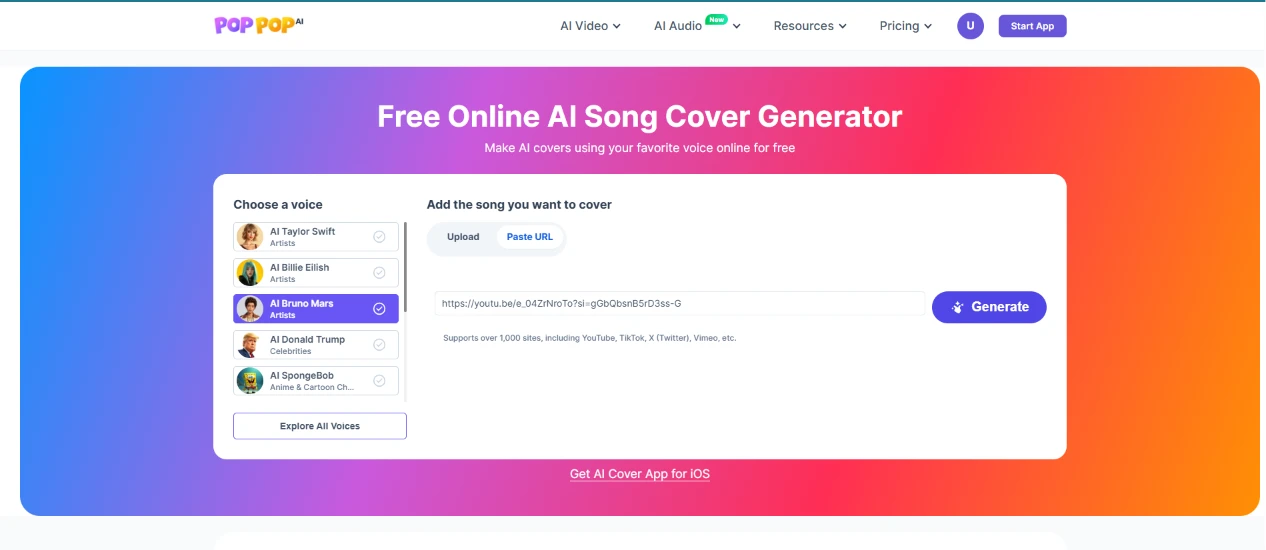
I moved to the song cover generator to put a nursery rhyme through a celebrity voice. I picked AI Bruno Mars, then pasted a YouTube link to "Wheels on the Bus" into the song field.
The voice list reads like a lineup of real people. Two of the five entries are pop stars (AI Taylor Swift and AI Billie Eilish), a third is AI Bruno Mars, a fourth is AI Donald Trump filed under Celebrities, and the last is AI SpongeBob under a cartoon heading. An "Explore All Voices" button underneath tells me five is only the shortlist. Bruno Mars is the ticked row here, tinted purple while the rest stay white.
The song field offers two tabs, Upload or Paste URL. I used Paste URL and dropped in a youtu.be link. The helper text under the field says the tool supports over 1,000 sites, and it names YouTube first.
This was the fastest setup on the platform. Two clicks and a paste, and Generate was live. No credit counter appears on this page either.
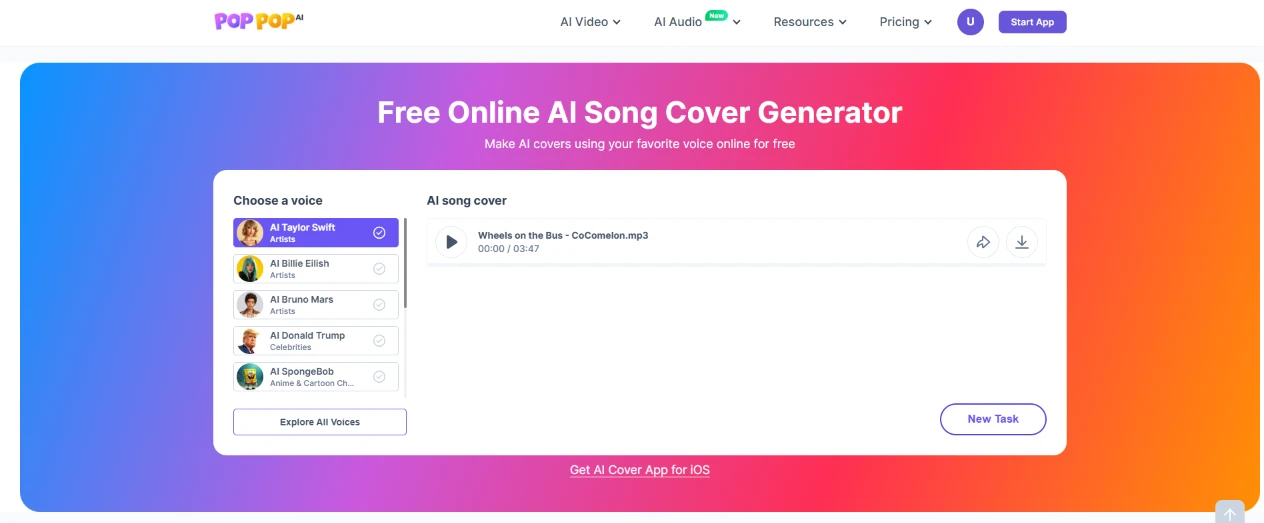
About 2 minutes later the cover was sitting in the right-hand panel as "Wheels on the Bus - CoComelon.mp3", running 3 minutes 47 seconds, with playback controls, a download arrow and a New Task button.
The YouTube link did not work, and that is the part worth writing down. The field advertises over 1,000 supported sites with YouTube named first in the list, I pasted a youtu.be link into it, and I still ended up having to supply the audio myself. The filename gives it away: what came back is an .mp3 I provided, not a stream the tool fetched. A field that accepts a link, names YouTube as supported, then quietly needs a file instead is the kind of thing you only discover by losing a few minutes to it.
There is a second oddity on this screen. The voice list has reset. Bruno Mars was the tinted row when I set the job up, and here the tint has jumped back to AI Taylor Swift at the top. I know which voice I picked because I picked it, but nothing on the result screen confirms it, so coming back to this page later I would have no way to tell which voice made the file.
Two minutes for a 3 minute 47 second track is quick and click here to listen to it.
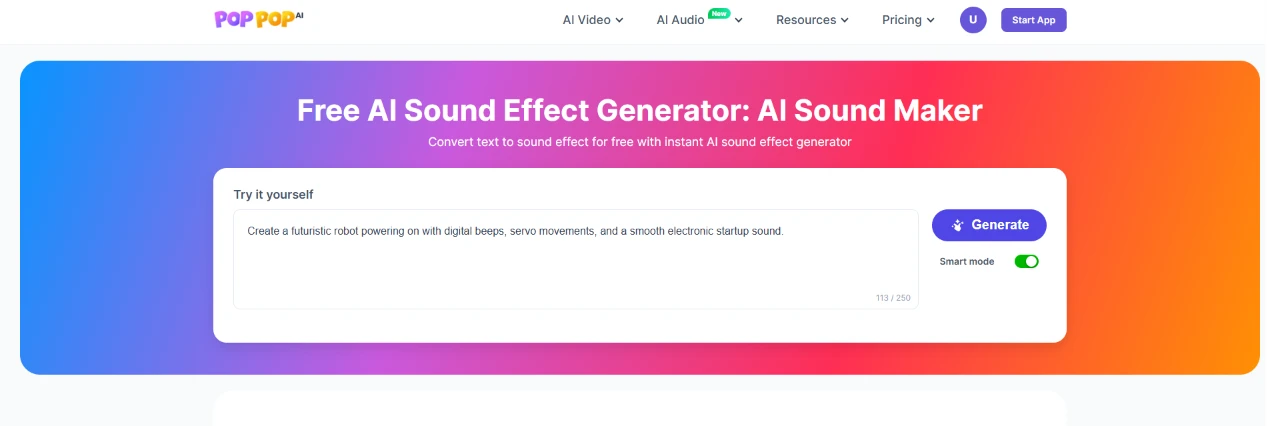
Last thing I tried was the sound effect generator. I typed this prompt:
"Create a futuristic robot powering on with digital beeps, servo movements, and a smooth electronic startup sound."
The counter logged it at 113 of 250 characters. A Smart mode toggle sat switched on beside the Generate button, and nothing on the page explains what Smart mode does or what happens if I switch it off.
The 250 character ceiling is half of what the text to speech box allowed, which is fair enough for a sound effect. A prompt like mine is a description rather than a paragraph.
The whole page is one text box and one toggle. There is no duration control and no way to tell it how long the robot should take to power on, so a prompt is the only handle I have on a result that lives or dies on timing.
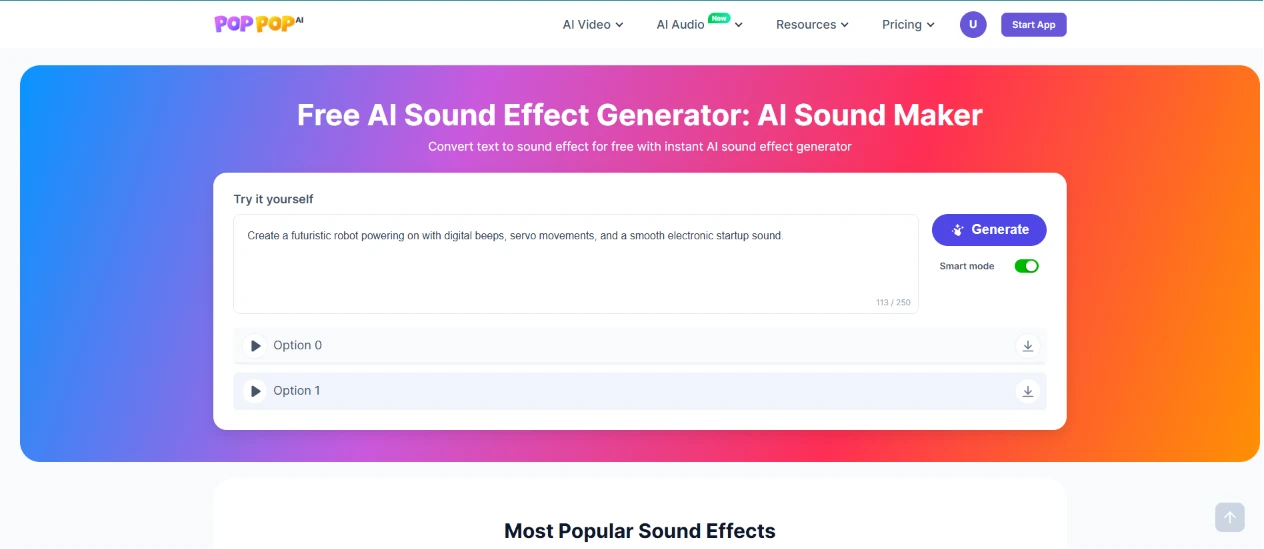
The generation took about 5 minutes and came back with two files rather than one, stacked under the prompt box, each with a play button and a download arrow. Underneath them the page rolls on into a "Most Popular Sound Effects" section.
Getting two takes from one prompt is a good default. It costs nothing extra, and it gives me something to choose between instead of a single result I either accept or pay to redo.
The 5 minutes is harder to forgive. It is the longest wait of the whole session, and it is attached to the shortest output on the platform. The text to speech took 2 to 3 minutes for 441 characters, and the song cover took about 2 minutes for a track running 3 minutes 47 seconds. A short robot noise taking longer than either of those is backwards.
And the two takes are labelled Option 0 and Option 1. Zero-indexed, in a consumer product, which tells you exactly which side of the house named them and click here checkout the result.
| Dimension | Our test | User signal | Verdict | Composite |
|---|---|---|---|---|
| Output Quality Naturalness and likeness of voices | 8 | 8.5 | Good | |
| Voice Library Breadth of available characters | 7.1 | 6 | Moderate | |
| Platform Reliability Errors, uptime, processing success | 8.9 | 9 | Excellent | |
| Ease of Use Learning curve and navigation simplicity | 8 | 8 | Good | |
| Value for Credits Fairness of credit consumption | 6.2 | 5.4 | Weak | |
| Fan Features Support for idols and fandom groups | 5 | 5.2 | Weak |
Toolscopia uses cookies to keep you signed in, remember your preferences, and understand how our reviews get read. Analytics are anonymous. See our privacy policy for the full detail.
Comments 0
Join the discussion and share your perspective.
Sign in to post a comment and reply to other readers.
No comments yet
Be the first to share your perspective on this tool.